
How Pinterest Built Text-to-SQL: The Table Discovery Problem
Most text-to-SQL projects solve the wrong problem. Pinterest fixed the right one.
Pinterest published a detailed breakdown of their text-to-SQL implementation in April 2024. Most AI data projects focus on query generation. Pinterest tackled a harder problem first: helping users find the right tables.
The result? A 35% improvement in SQL writing speed. And an open-source tool any team can use.
The Real Bottleneck
Every data team knows the feeling: you need to answer a question, but first you need to find the data. Which table has what you need? Is it user_events or user_activity or events_daily? And which columns matter?
Pinterest has "hundreds of thousands" of tables in their data warehouse. At that scale, table discovery becomes the primary obstacle. As they put it:
"Identifying the correct tables amongst the hundreds of thousands in our data warehouse is actually a significant challenge for users."
Their text-to-SQL implementation lives inside Querybook, Pinterest's open-source big data SQL query tool. They could have started with query generation. Instead, they started with table selection.
Two Iterations, Two Approaches
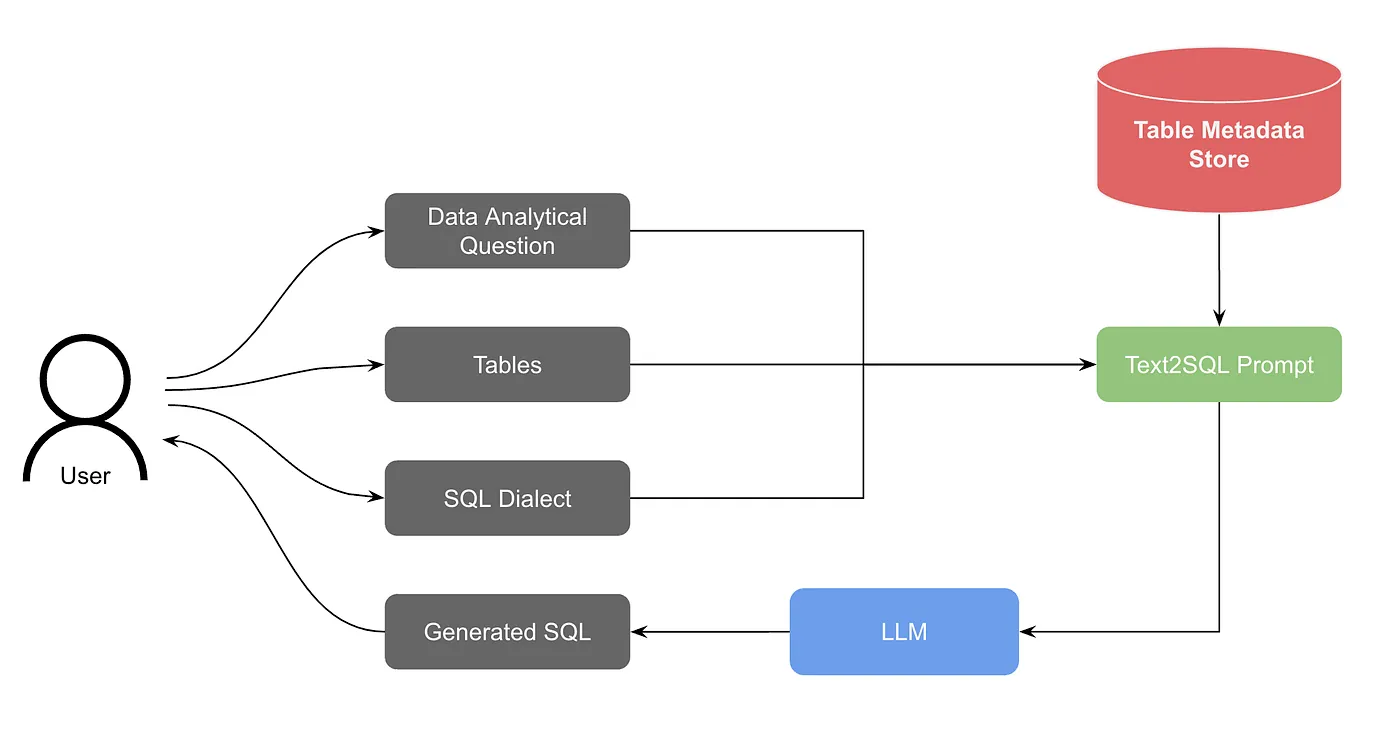
Version 1: Basic LLM
The first version was straightforward:
- User asks a question and selects tables to use
- System retrieves table schemas from metadata
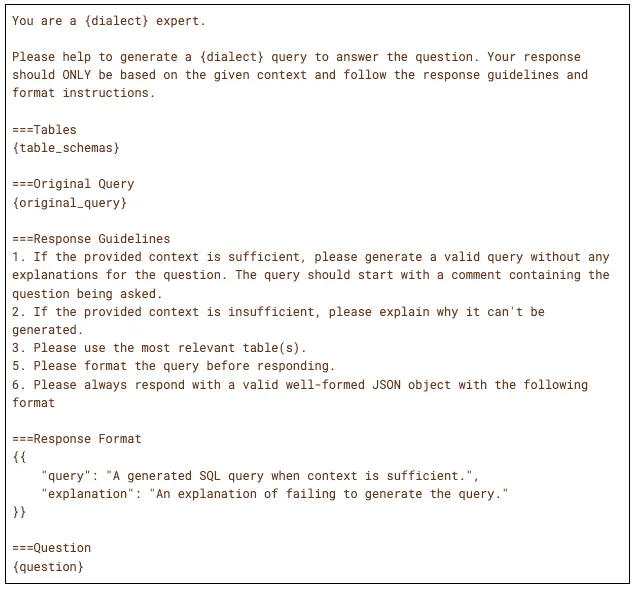
- Question + schema + SQL dialect go into a prompt
- LLM generates SQL
- Response streams back via WebSocket
This worked, if users already knew which tables to query. The first-shot acceptance rate was around 20%. Not great, but enough to prove the concept.
Version 2: RAG for Table Selection
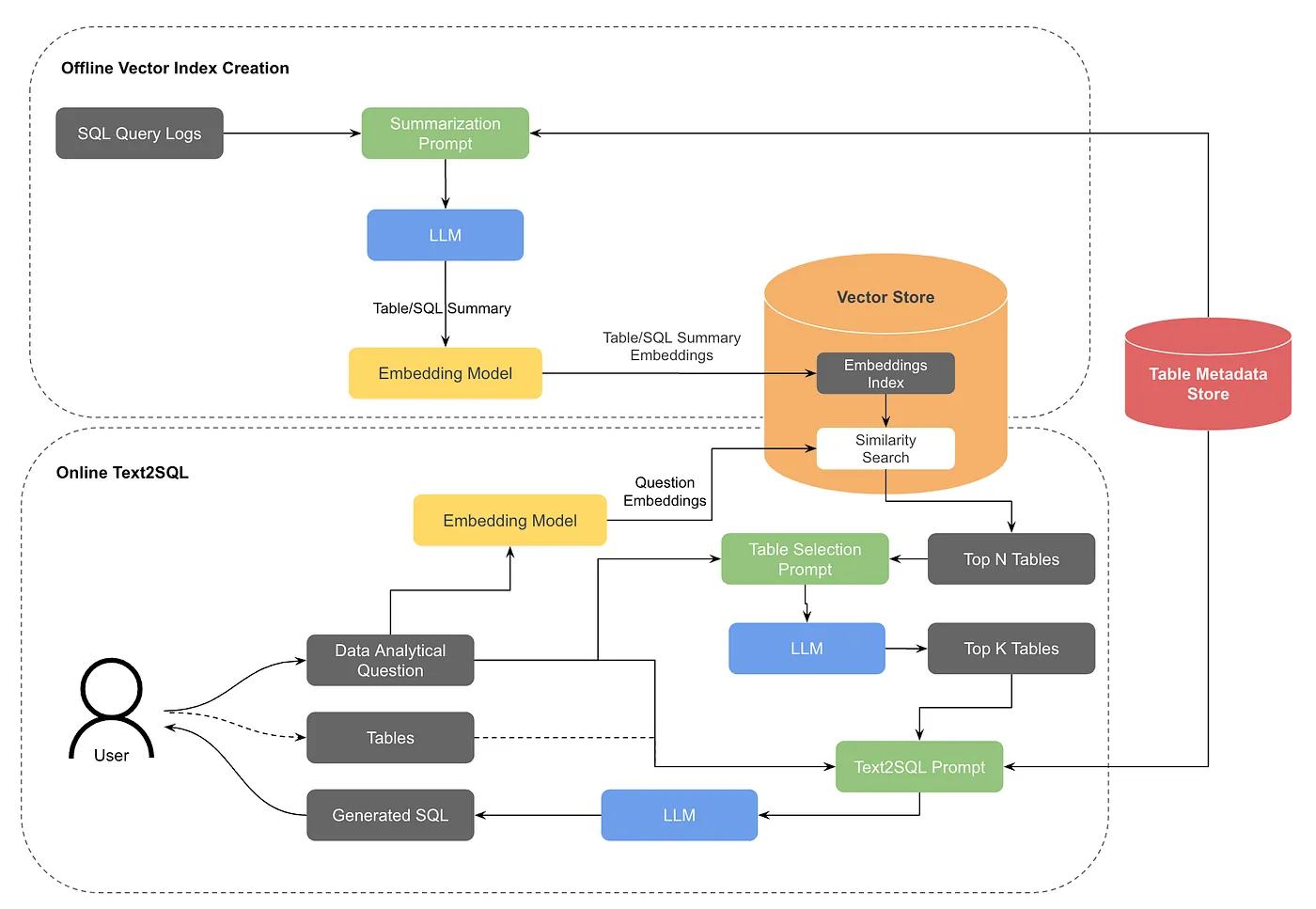
The breakthrough came when they added retrieval-augmented generation for table discovery:
- An offline job generates vector embeddings for table summaries and historical queries
- When a user asks a question without specifying tables, the system converts their question to embeddings
- Similarity search finds the top N candidate tables
- An LLM re-ranks to select the top K most relevant tables
- User confirms or adjusts the selection
- Standard text-to-SQL proceeds with confirmed tables
OpenSearch serves as the vector store with two embedding types: what each table contains, and how tables are typically queried. That pairing matches user intent to the right tables even when the phrasing differs from column names.
The system also implements table tiering: frequently-used, well-documented tables are prioritized over rarely-accessed ones. This pragmatic approach acknowledges that in most data warehouses, 20% of tables answer 80% of questions.
The Metadata Investment
One finding stands out in Pinterest's evaluation:
"The search hit rate without table documentation in the embeddings was 40%, but performance increased linearly with the weight placed on table documentation up to 90%."
A 40% hit rate without documentation. 90% with it. More than double, from metadata alone. The pattern repeats in every build we cover: OpenAI's six context layers, Vercel's semantic layer, Netflix's LORE. Context beats model upgrades.
Pinterest also tackled a subtle but important detail: low-cardinality column values. When a user asks about "web platform," the generated SQL might incorrectly filter for platform='web' instead of the actual value platform='WEB'. By including sample values for frequently-filtered columns, they eliminated this class of errors.
The 35% Speed Improvement
Pinterest measured real-world usage, and they are open that it "importantly does not control for differences in tasks."
Despite that caveat, they found:
"A 35% improvement in task completion speed for writing SQL queries using AI assistance."
First-shot acceptance improved from 20% to above 40% as the system matured and users learned to work with it.
What's Missing
Pinterest is refreshingly candid about current limitations:
No query validation. Generated SQL goes directly to users without verification. A constrained beam search or execution-based validation could catch errors earlier.
No user feedback loop. The system doesn't learn from corrections. Building this would require UI work and a pipeline to incorporate feedback into the vector index.
Benchmark mismatch. Standard benchmarks like Spider use "a small number of pre-specified tables with few and well-labeled columns." Real-world data warehouses have thousands of denormalized tables. Pinterest calls for "more realistic benchmarks which include a larger amount of denormalized tables and treat table search as a core part of the problem."
This last point matters. Academic benchmarks assume table selection is solved. Enterprise reality is the opposite.
The Open Source Advantage
Unlike Uber's QueryGPT, LinkedIn's SQL Bot, or Salesforce's Horizon Agent, Pinterest's implementation lives in an open-source tool. Querybook is available on GitHub, and the text-to-SQL feature is part of it.
This matters for teams without Salesforce's internal platform or OpenAI's engineering resources. You can actually use what Pinterest built, not just read about it.
Key Takeaways
1. Solve table discovery first. If users can't find the right data, query generation doesn't matter.
2. Metadata quality dominates. Pinterest saw 2x+ improvement from documentation alone. Invest in your semantic layer before upgrading your model.
3. Vector search + LLM re-ranking. Speed from vectors, accuracy from LLMs. The hybrid approach handles scale.
4. Measure real workflows. Pinterest tracked actual task completion speed, not just query accuracy. The user outcome is what matters.
5. Ship and iterate. They started at 20% acceptance and improved to 40%+. The first version doesn't need to be perfect.
The future of text-to-SQL isn't just about generating correct queries. It's about helping users find the right questions to ask in the first place.
Related reading:
- Uber's QueryGPT: Multi-Agent Architecture for Enterprise Scale
- OpenAI's Data Agent: 6 Layers of Context
- Netflix's LORE: Why Explainability Beats Accuracy
Rick Radewagen
Rick is a co-founder of Dot, on a mission to make data accessible to everyone. When he's not building AI-powered analytics, you'll find him obsessing over well-arranged pixels and surprising himself by learning new languages.