
Measure Dot against answers you trust and let it train until they pass, move old dashboards over with every number checked, and find any chat with a keystroke.

Train Dot on the questions that matter
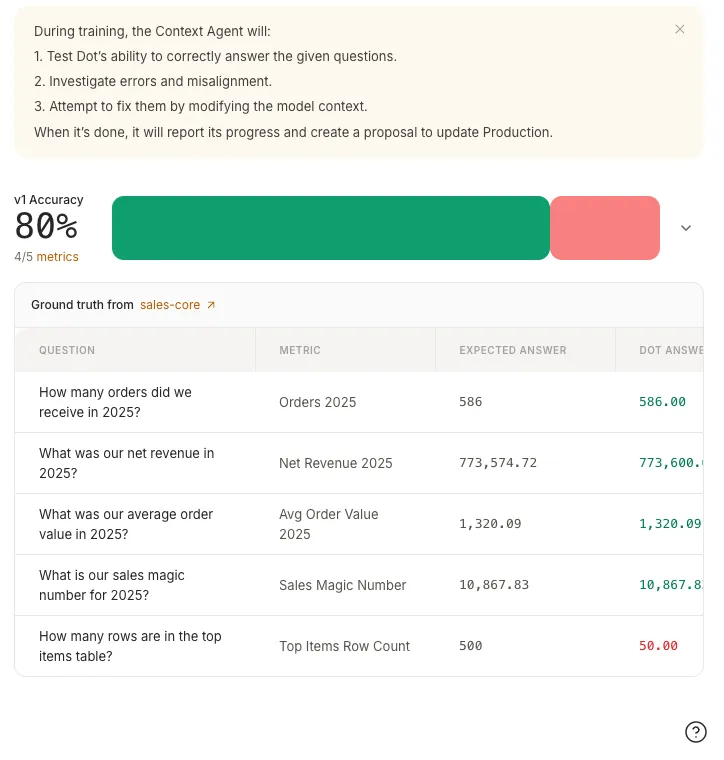
You know what the right answers are: last year's revenue, the order count you report every Monday, the churn number the board saw. Now you can hold Dot to them. Give Train a set of questions with trusted answers and it tests Dot against every one, investigates the misses, and fixes what it finds by improving notes, relationships, and table docs in an isolated environment. Each round ends with a scoreboard: the accuracy before, the accuracy after, and every expected answer next to the answer Dot actually gave.
Nothing touches production on its own. When a training is done it hands you a proposal, a reviewable diff of everything it wants to change, and the model only updates when you merge it. The question sets are reusable too: an Evaluation can run against production or any environment whenever you want a fresh read on how good Dot currently is, no training attached.
Move your dashboards into Dot, every number checked
Ask Dot to migrate a Tableau or Sigma dashboard and it rebuilds the whole thing as a Dot dashboard: tiles, filters, tabs. Then it verifies its own work, running the source's numbers and the rebuilt dashboard's numbers side by side and comparing them tile by tile, so a migration ships with proof instead of a promise. Tiles that match are marked as verified; anything that drifts says so, with the reason. Power BI joins this month with read-only access to reports and their models, so the same workflow reaches a third BI tool.
Schedule any dashboard, and choose how much work each run does
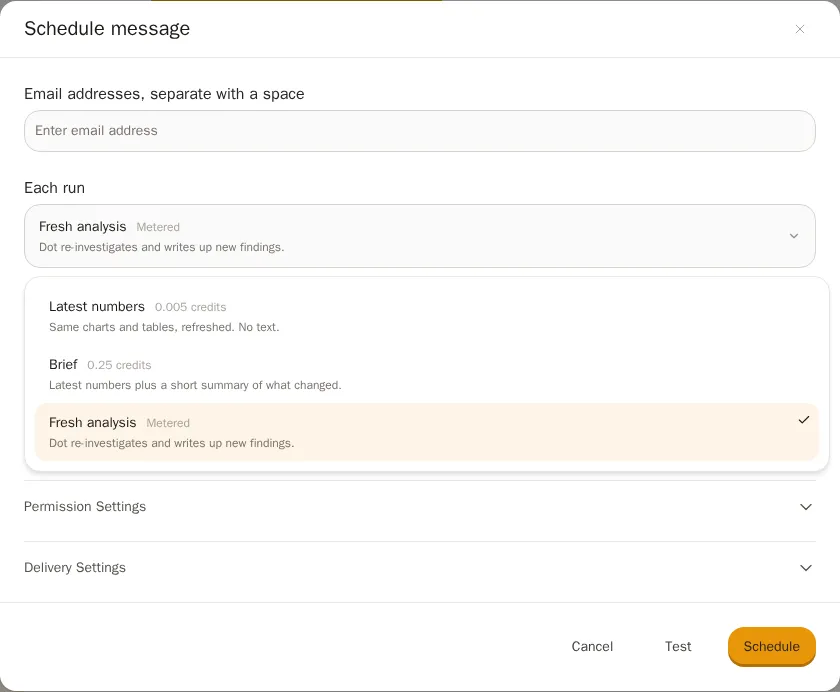
Any dashboard can now deliver itself on a schedule to email, Slack, or Teams. The new part is the dial: each run can send latest numbers (the charts and tables, refreshed, for a fraction of a credit), a brief (the numbers plus a short summary of what changed since last time), or a fresh analysis (Dot re-investigates and writes up new findings). You pick how much intelligence each delivery is worth. PDFs got a full redesign along the way, and exporting a filtered dashboard now produces a PDF of exactly the view you filtered, not the default one.
Find any chat with a keystroke
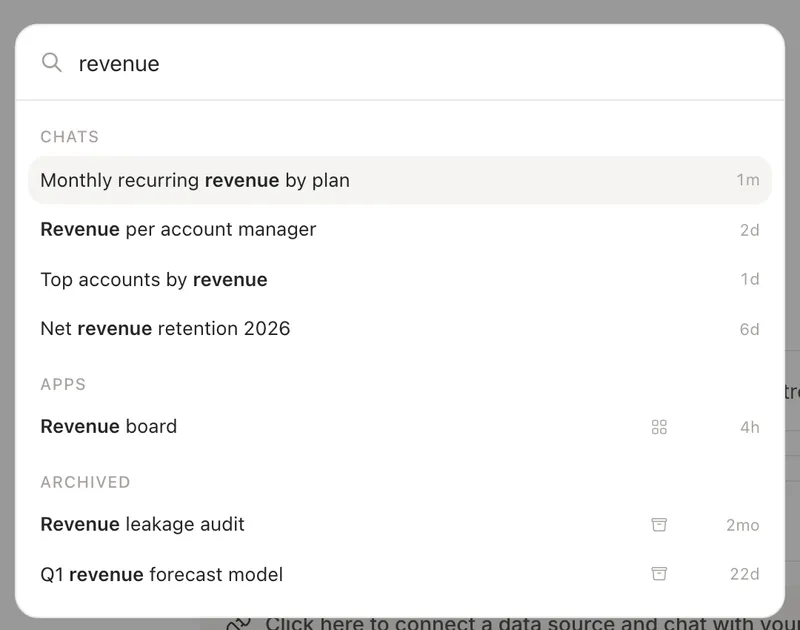
Press Cmd+K (or Ctrl+K) and search everything you've asked Dot. The palette matches chat titles and full message text, finds dashboards by name or folder, and shows archived chats too: hover one and restore it in a click. The analysis you archived two months ago is now a keystroke away instead of gone.
Row-level security that knows who's asking
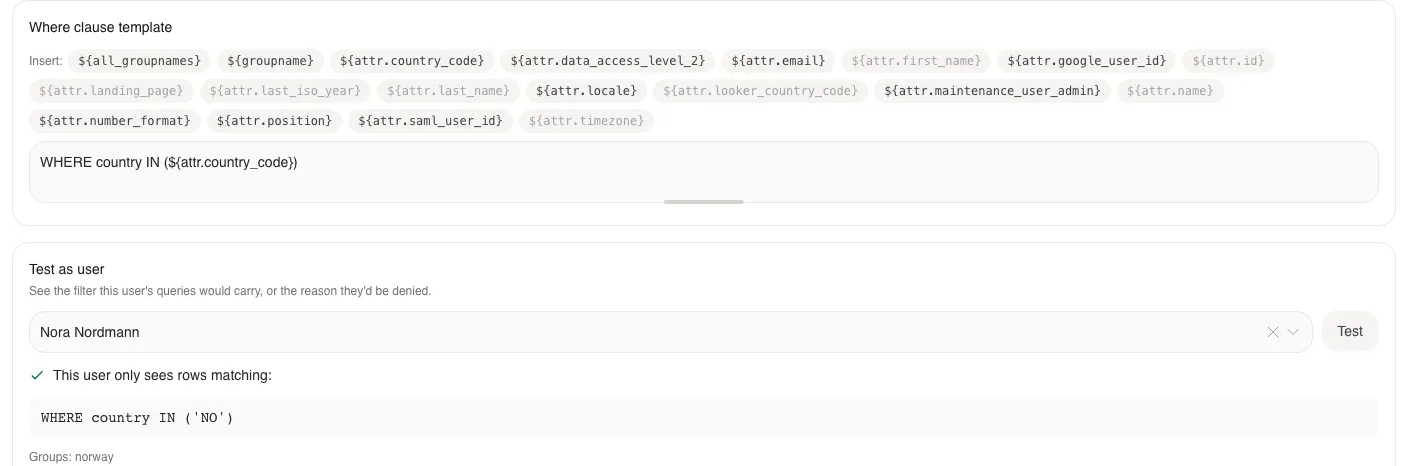
Row Level Permissions can now key on user attributes, per-person values like country or region synced straight from Looker, so one rule such as WHERE country IN (${attr.country_code}) filters every user to exactly their rows. A user with no value is denied rather than shown everything, and a new Test as user preview shows the exact filter any person's queries would carry before you save the rule.
Identity got simpler around it. Okta groups can now act directly as Dot groups, synced from the ID token at every login, so membership changes in Okta take effect on the next sign-in with nothing to maintain in Dot. And for Snowflake teams on Immuta, Dot can run each person's queries under their own Immuta-vended role, so masking and row policies apply per user while Dot itself holds no elevated access.
Dot reads your Google Drive
A new read-only connector lets Dot search and read Google Docs, Sheets, Slides, and PDFs, so the context behind a question ("the definitions doc", "the Q3 planning sheet") is available where the question is asked, including from Slack and Teams. You share one folder or shared drive with a service account and Dot sees exactly that, nothing more.
Everything else this month
For admins: Energy modes gained governance: set the org default mode for new chats, and decide who can use each mode with an audience per tier (everyone, nobody, or specific groups). Chosen groups can now send scheduled emails outside your allowed domains for the partner and client reports that need it. Snowflake's Internal Marketplace can sync into Dot, so users see which curated data products exist and which are already queryable. And when a fresh connection's first sync fails, Dot emails you about it instead of waiting to be discovered.
Connections: Tableau's Connected App setup lost most of its ceremony and saving a connection no longer wipes the Connected App you configured. Google Sheets connections gained a sync button. SQL Server connection failures now explain themselves in plain language. And BI-tool authoring grew: Dot can build and update Metabase dashboards reliably, and Looker dashboard edits keep table calculations and custom fields intact.
Dashboards: maps arrived as a chart type, KPI tiles can render progress against a target, and bar charts learned 100% stacked and diverging forms. The person who built a dashboard can keep editing it after it's shared. Filter selections now live in the URL, so a copied link opens the exact filtered view you were looking at, and each viewer's interactive state is saved per person. The dashboard editor also loads noticeably faster.
In chat: editing a chart now shows a preview before you commit, keeps every version in a small history strip, and lets you restore any earlier one. Credit-limited users see exactly when credits free up, and if a limit pauses an analysis mid-run, the finished part of the work is shown rather than lost. Group chats with Dot in Slack and Teams are named after their members instead of a code, and energy keywords like !frontier now work anywhere in a Slack message.
Plus small touches: CSV and Excel uploads no longer coerce numeric-looking ID columns into numbers, uploading the same file twice no longer attaches it twice, and the sidebar account area got a cleaner layout with your organization ID one click away.