
Every answer can now show where its numbers come from, KPI tiles carry their own history, and long conversations feel instant.

See where every number comes from
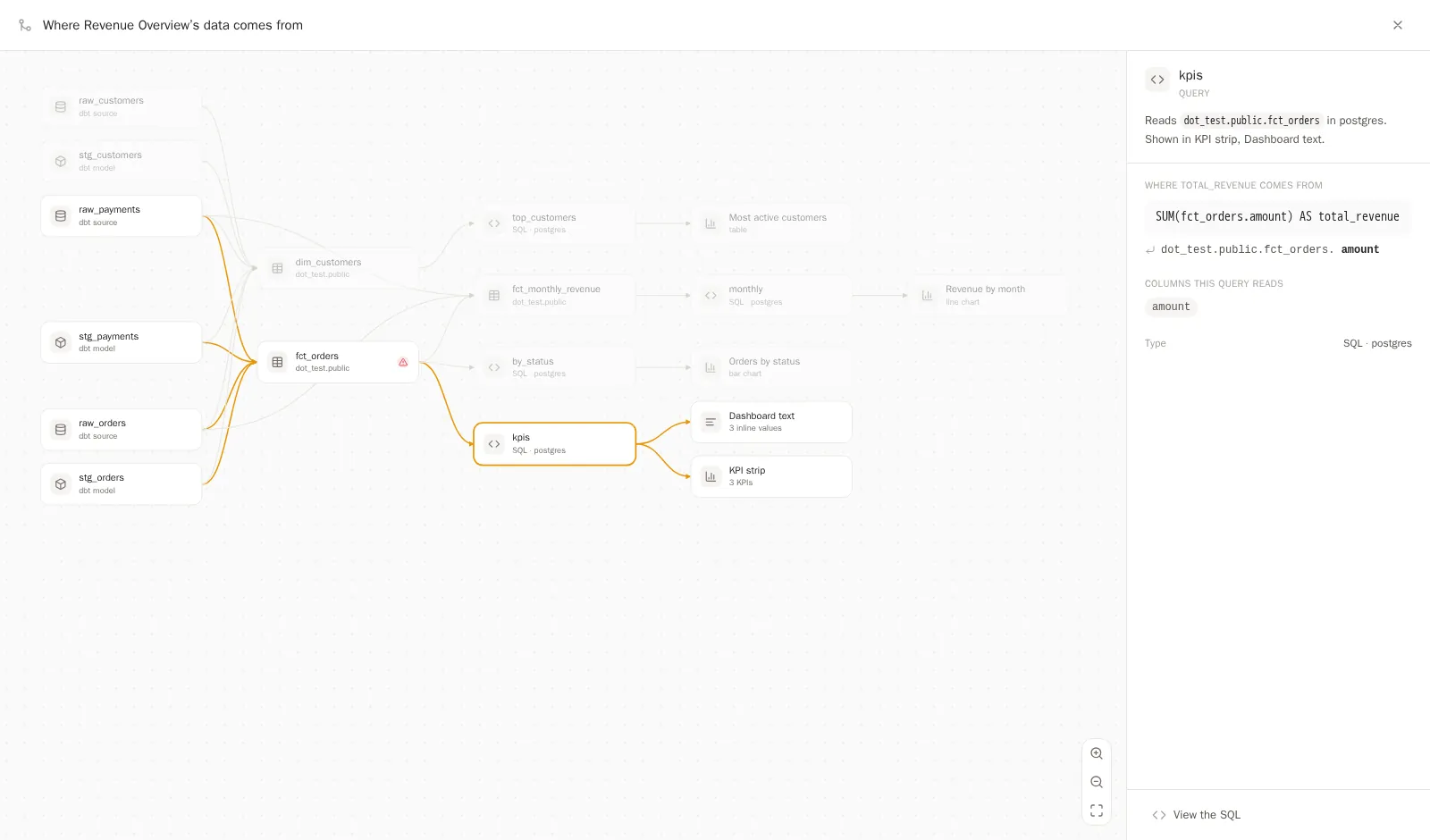
"Where does this number come from?" is the question that decides whether an answer gets used or quietly ignored. Every Dot answer can now show you. Open Full logs under an answer and hit Lineage: a map draws the whole path, from the warehouse tables through the exact SQL queries to the answer itself, dbt models included. On a dashboard, click a number, open its query, and hit View lineage to trace the one column it came from, lit end to end, with the formula spelled out in plain terms.
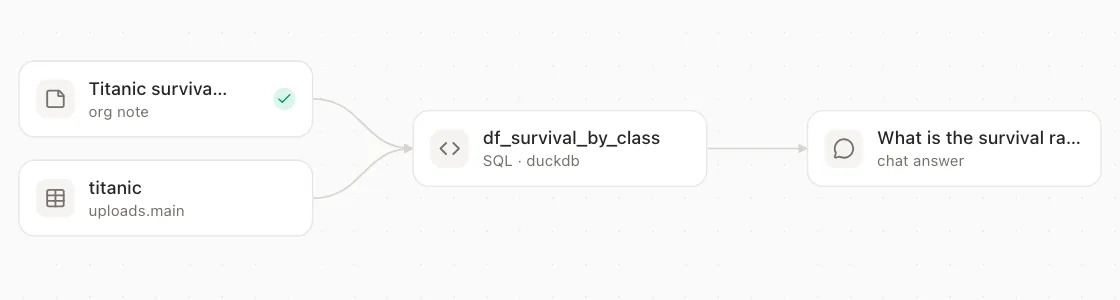
The map covers more than data. When one of your team's notes steered a query, the lineage draws that note into the graph and tells you which answer it shaped, so tribal knowledge stops being invisible. Big models stay readable too: upstream dbt tables fold behind a small +N badge and expand one level at a time, and a search box jumps straight to any table or query.
KPI tiles that show their history
A number alone can't tell you whether it's good news. KPI tiles on dashboards now carry a trend line under the headline figure: hover any point to compare this year against last, scrub across the months, and watch sibling tiles follow your cursor so a whole row reads as one moment in time. A mini size packs five to eight sparkline tiles into a row, and when Dot builds a time-based dashboard it now adds trends by default.

Filters learned their blast radius, too. Dashboards can now have sections with their own filter scope, and changing a filter re-runs only the queries that actually use it. The rest of the page doesn't blink.
Chat keeps up with you
Dot got 30% faster in the last 30 days. History loads in a few quick pages, switching back to a recent chat paints instantly, and streaming answers render smoothly instead of stuttering under their own weight. Long chats get a minimap along the side: hover a marker to preview the question, click to jump anywhere. Renaming or archiving a chat applies the moment you do it.
Every query, signed
Every SQL query Dot runs in your warehouse now carries an audit stamp: a comment naming the user, the workspace, what triggered it (a question, a schedule, a dashboard refresh), and a link back to the exact chat. On BigQuery the same facts also land as job labels, so they surface in INFORMATION_SCHEMA and your billing export. Your data platform team can trace any query in their logs back to the conversation it served, with nothing to configure.
Context that keeps itself fresh
Your dbt repo now re-syncs daily by default, no schedule needed. When a sync hits a file that won't parse, Dot works around that one file, syncs the rest, and says exactly what happened on the connection card instead of failing silently. Power BI joins the connectors with scheduled syncs. And Looker answers hew closer to Looker itself: Dot now sees each explore's default filters instead of accidentally overriding them, flags dashboard tiles whose logic lives in custom filters or table calculations, and can run a tile's exact saved query to verify its number.
Everything else this month
For admins: Google Workspace groups can now drive Dot roles, groups and workspace access, just like Entra ID, rolled out per workspace or org-wide once you map them. Environments now mirror to your Git remote in both directions by default: push to the branch and the environment updates, change the environment in Dot and the branch follows. Workspaces support environments too. The users list sorts by weekly credits used, History gains credits and credits-per-message columns, and proposal review can be granted to modelers with its own permission flag.
Dashboards: a dashboard that fails to build now says what actually went wrong and offers a Rebuild button instead of pretending to build forever. My Apps now means exactly that, your apps, with admins getting a separate folder for everyone else's. Schedules for refreshes, reports and syncs can be paused and resumed from the redesigned Schedules page, and dashboards can keep logos and other assets in a folder of their own.
Connections: pasting a Tableau URL straight from the browser now just works, Default-site servers connect, and the Connected App check explains what is misconfigured instead of timing out. Malloy projects living in a repo subfolder connect now. Dot can also measure how far back each column's data actually goes, so a field added mid-history stops silently truncating "all time" answers (warehouse probing is opt-in).
Plus small touches: number formatting in answer tables and charts is now computed deterministically per column and follows note conventions like "use German number format", the chat composer stacks its controls under the input so text never runs beneath buttons, opening a private shared chat while logged out now takes you through login and straight back to the chat, and animations across the app got cheaper and smoother.