
Pick how hard Dot thinks on each question, publish dashboards someone has vouched for, and give your data model a dev branch.

Pick how hard Dot thinks
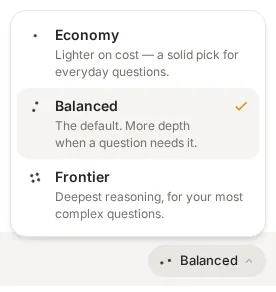
The cost of intelligence is splitting in two: every year a given level of capability gets about ten times cheaper, while the best frontier models get about four times more expensive. So the right amount of horsepower for a question is now a genuine choice, and Energy Mode is where you make it. It's a small pill next to the ask box with three tiers: Economy for everyday lookups, Balanced as the dependable default, and Frontier for your most complex questions. Your pick sticks for the thread, admins set the company default and can turn individual choice off, and in Slack, Teams or email you can prefix a question with !economy or !frontier. Typing "go deep" escalates a single question to Frontier without changing anything else.
Publish dashboards, certify the ones you trust
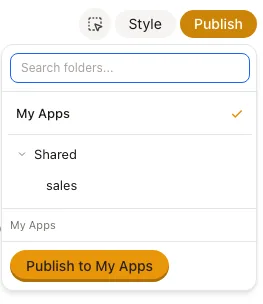
A good answer deserves a longer life than a chat scroll. With Apps, you publish a chat answer into a dashboard: it lands in a folder, gets a shareable link, and re-runs its queries on demand or on a schedule, so Monday's numbers can be Monday's. Anyone with access can hit Ask to question a dashboard directly.
Trust is now explicit, too. An admin or modeler can mark a dashboard Certified, and the badge names who vouched for it and when. Certification is pinned to the exact published version: edit the dashboard and the badge comes off until someone re-certifies. The uncertified long tail takes care of itself - dashboards nobody has opened in 60 days are archived automatically, hidden from lists and search but still reachable by direct link and one click away from coming back. Certified dashboards are exempt.

Apps are off by default while we roll them out. Admins can switch them on under Advanced Settings > Feature Flags > Apps / Dashboards, and choose whether non-admins can create their own.
Dot remembers you, and your past work
Say "remember I always look at EUR" in any chat and Dot saves it instantly as a personal memory - private to you, visible and editable on your Profile page. And when you reference earlier work ("same breakdown as last month"), Dot now finds that past conversation itself and reuses its tables and queries instead of starting from zero. It only ever looks at your own chats. Company-wide definitions still take the governed path: they become proposals an admin reviews before anything changes for the team.
A dev branch for your data model
dbt taught analysts to treat their work like software: version it, review it, and promote it through environments instead of editing production live. Dot now works the same way. Environments let you fork production into an isolated copy of your data model - the docs, metrics, notes, relationships and skills, never the warehouse data itself - so you can redefine a metric and test your questions against it while everyone else keeps working against production.
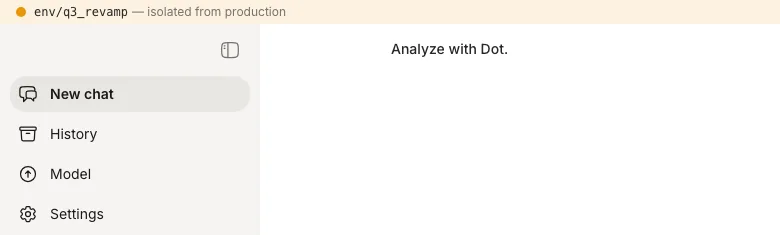
A colored band across the top of the app keeps you sure of where you are. When the answers hold, review the diff and merge back, with conflict resolution if production moved under you. Teams that want code review can mirror an environment to Git and open a pull request for every change (off by default, in Advanced Settings).
Exact numbers from the tools you're replacing
Dot now reads your existing BI estate closely enough to retire pieces of it. Connect Tableau with a Connected App and Dot extracts the exact values a dashboard tile renders, as you, with your Tableau permissions applied. Admins can ask Dot to migrate a Tableau or Metabase dashboard, and it rebuilds the dashboard as a Dot app, checking its numbers tile by tile against the original. A new Sigma connector reads workbook tiles as rendered, Slite brings your team wiki into Dot's context, and Malloy joins as a semantic layer connection, so metric definitions in code answer with full fidelity.
Everything else this month
For admins: weekly credit limits can now be a flat default, per user, or shared group pools, so one heavy team can't drain the month. Microsoft Entra ID groups map onto Dot roles, groups and workspaces, rolled out per workspace or org-wide. Row-level security extends to Looker and Malloy sources, and modelers' History view is scoped to the groups they belong to.
Reports and email: scheduled report emails now tell recipients they can simply reply to ask about the report, and Dot answers in the same thread. When you email Dot a question, the acknowledgment links to the live chat so you can watch the answer take shape. Scheduled Slack reports arrive as one tidy message.
In chat: answers render live while the chart is still being drawn, web charts get a download-as-PNG button, shared chat pages now show their threads, and streaming text, motion and post-login load all got noticeably smoother.
Connections: you can cancel a running sync, filter which objects sync at all, and follow progress in a sync log drawer. ClickHouse views and materialized views now sync, Google Sheets table names survive a re-connect, and the Query tab links straight back to Looker for queries built on an explore.
Plus a pile of small touches: wide wordmark logos render properly in chat and login, workspaces can carry display names, shared links unfurl nicely when embedded, History can show who asked via Slack, dashboards behave better on mobile, and password reset and OAuth flows got a security hardening pass.