
How To Set Up Self-Service Analytics In 2026?
This guide covers how to set up self-service analytics with Dot, an AI data analyst, and what your team can do once it's live.
TL;DR
- Self-service analytics means anyone in the business can answer their own data questions, governed by definitions the data team sets once.
- With Dot, the setup runs to six steps and takes about an afternoon: you connect your warehouse, let the Context Agent learn your first use case, pick the data it can see, define your joins, and put it in Slack or Teams.
- Every answer ships with the exact SQL and Python behind it, and the Context Agent keeps definitions consistent, so the numbers hold up.
- Dashboards, SQL libraries, request queues, and spreadsheet exports each solve part of the problem, but on their own they leave most of the company waiting.
How to set up self-service analytics in 2026?
The most dependable way to make analytics self-service in 2026 is an AI data analyst that connects to your data warehouse and answers questions in plain language.
Self-service analytics means people across the business can answer their own data questions without routing every one through the data team.
A tool in this category usually does a few things:
- Connects to your data warehouse or semantic layer without moving the data.
- Translates questions into governed SQL and runs them.
- Applies shared metric definitions so two people asking the same thing get the same number.
- Delivers answers where people already work, like Slack, Teams, or email.
Dot is an AI data analyst built for exactly this. A few things it does that matter here:
- Answers questions in Slack, Microsoft Teams, email, or its own web app.
- Shows the exact SQL and Python behind every answer, so anyone can check the work.
- Keeps definitions consistent through its Context Agent.
- Works on top of the stack you already have (Snowflake, BigQuery, dbt, Looker, and more) and doesn't try to replace it.
Here’s how you can set it up: 👇
Step 1: Connect your data warehouse
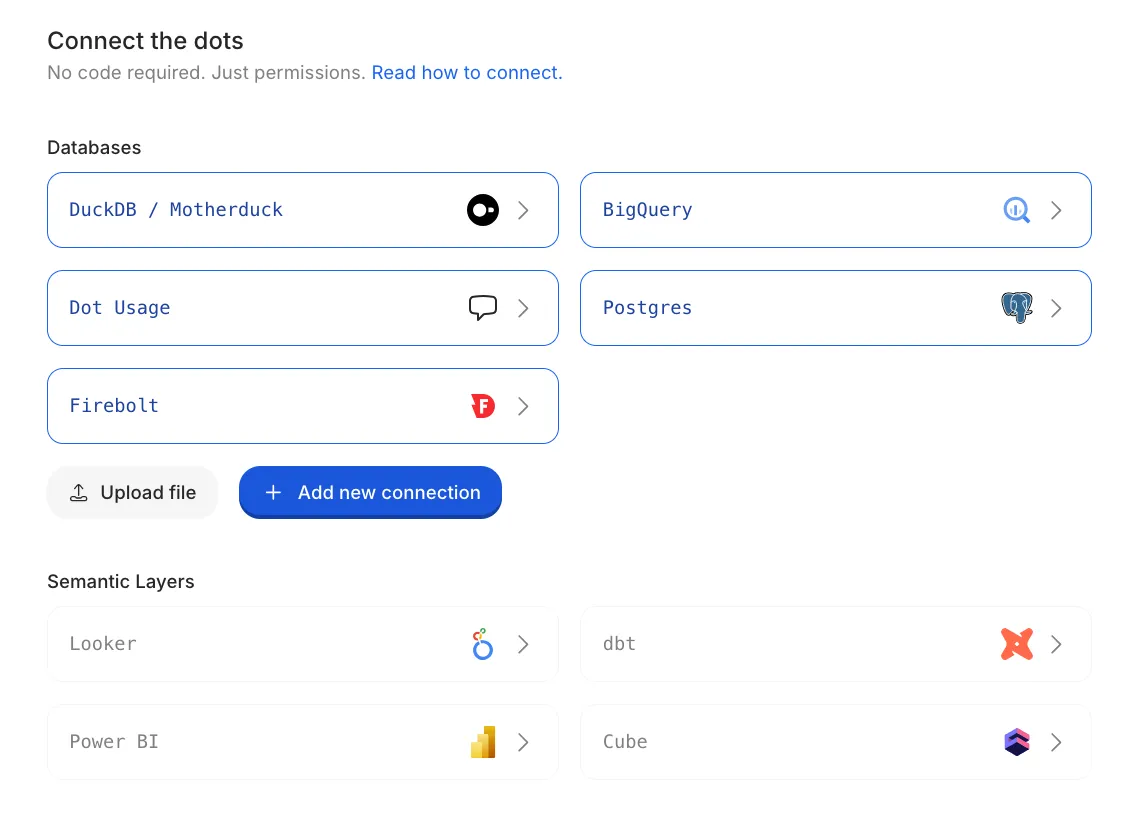
Everything starts with giving Dot read access to where your data already lives.
To do it:
- Go to Settings, then Connections.
- Add your warehouse or semantic layer. Snowflake, BigQuery, Postgres, Redshift, Databricks, dbt, Looker, and Power BI are all supported.
- Authorize with a read-only technical user.
- Click Sync so Dot can read your schema and the tables and columns inside it.
Step 2: Tell the Context Agent what you're trying to do
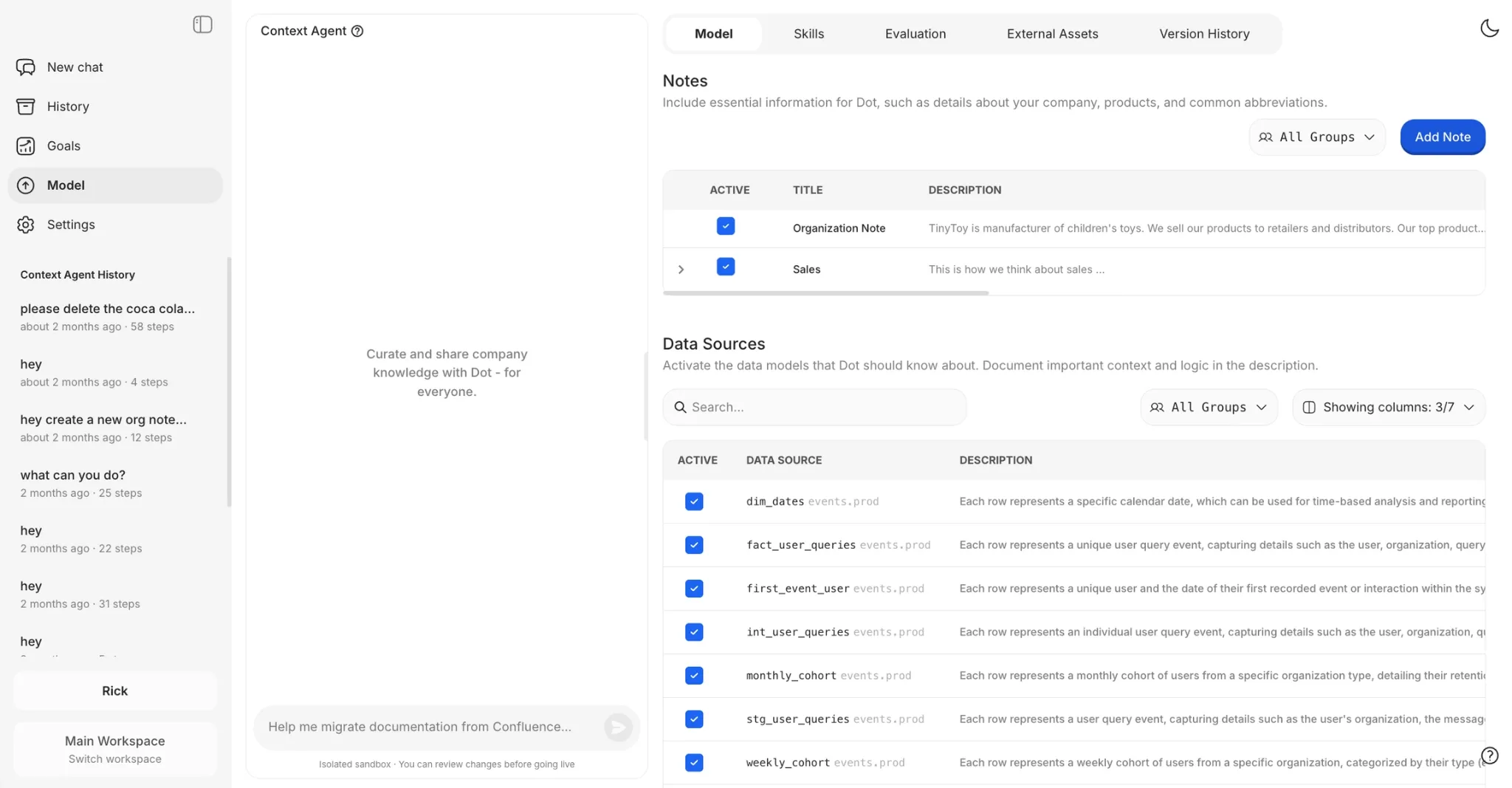
Dot's Context Agent does the heavy setup work for you, so you don't have to document your whole company by hand before you get value.
To do it:
- Open the Context Agent from the sidebar.
- Describe your first use case in plain English. Product analytics, say, or weekly revenue reporting.
- Let it interview you and explore the connected data, then draft a starting setup you can edit.
- Review what it proposes, then approve.
Don't try to map everything on day one. Pick one use case and grow from there.
Step 3: Choose what Dot can see
Your data team stays in charge of what Dot knows, picking exactly which tables and fields are in scope.
In the Model section:
- Open Model.
- Select the tables and fields Dot should search.
- Click Suggest to auto-generate descriptions and pull sample values.
- Fix anything that reads wrong, then save.
💡 Pro Tip: Start with the tables behind your most trusted dashboards. They already hold business logic your team has agreed on, so you're documenting decisions that are settled, not picking fights over definitions.
Step 4: Define how your tables connect
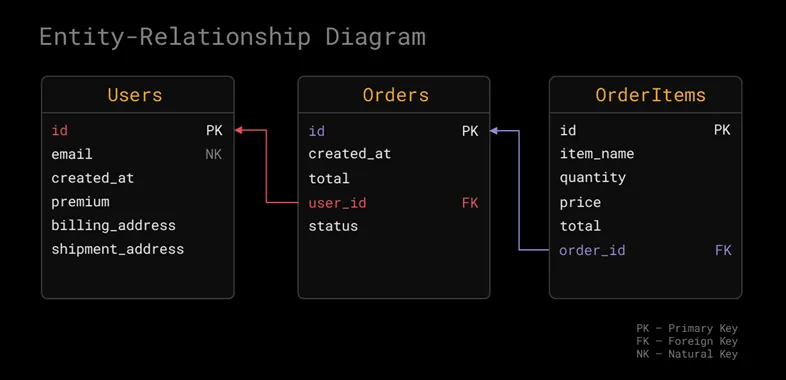
Telling Dot how tables relate stops it from double-counting rows or pulling a number from the wrong place.
Skip it, and Dot will still give you an answer. It'll just be confidently wrong, which is the worst kind of wrong to hand a CFO.
To do it:
- For each table, set its foreign keys.
- Point each foreign key at the table and key it references. For example, orders.user_id references users.id.
- Save the relationship.
💡 Note: A foreign key can span more than one column, and it should usually point at a primary or natural key.
Get this right, and you sidestep join fan-outs and the chasm trap, which are the usual reasons a total comes back wrong.
Step 5: Bring Dot to where your team already works
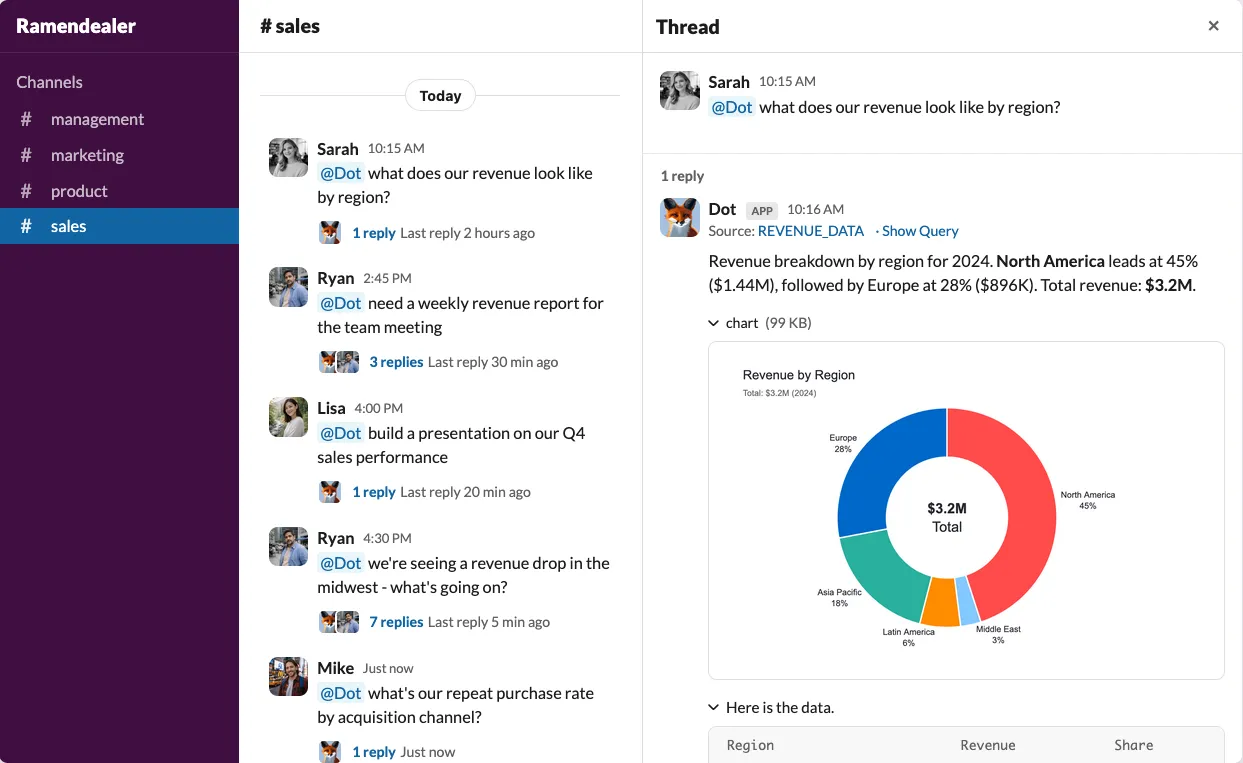
A self-service tool only works if people use it. And people use what's already open on their screen.
To do it:
- Go to Settings, then Connections.
- Connect Slack or Microsoft Teams.
- Invite the people who keep pinging the data team for numbers.
Now anyone can ask in a channel and get a chart back, no SQL required.
One thing worth coaching your team on: Dot answers best when a question names the metric, the entity, the time period, and the cut you want.
"How many active premium suppliers did we have in Paris in March 2024?" gives it everything it needs.
"What's our current revenue?" leaves too much open, and the answer will be vaguer for it.
Step 6: Test it before you trust it
Before you announce to the whole company that it's live, you want to kick the tires.
To do it:
- Ask 10 to 15 of the real questions your team fields every week.
- Open the footnotes on each answer to read the SQL and Python Dot ran.
- If an answer misses, open that chat and click Investigate. Root traces every decision Dot made and proposes a fix.
- Merge the fix and ask again.
Every correction makes the next answer better. And nothing changes in production until an admin approves it.
And there you have it. Self-service analytics, set up and stress-tested in an afternoon, not a quarter.
Why should you set up self-service analytics?
Setting up self-service analytics is how you stop being the team everyone waits on.
If people can't answer their own data questions, you run into the same problems week after week:
- Your data team burns roughly a third of its week on requests that get answered once and never reused.
- Stakeholders wait days for a single number, then make the call on gut feel anyway.
- Dashboards pile up until two teams quote two different revenue figures in the same meeting.
- Your best analysts spend their days rewriting the same SELECT statements when they could be doing real analysis.
- Every "quick question" jumps the queue and pushes the strategic work further back.
How to get the best out of self-service analytics?
The teams that get the best results out of conversational analytics software like Dot tend to make a few moves the set-it-and-forget-it crowd never gets around to:
Teach it the analyses that don't fit in SQL
Some of your most valuable answers aren't really queries. They're a forecast, or an action like opening a ticket when a customer's usage drops.
A custom skill is a small Python tool you hand Dot for exactly those.
- You define it once and decide who's allowed to run it.
- Dot then calls it mid-investigation, the same way it writes SQL.
Give each team and client its own room
Finance and marketing rarely want the same tables in front of them, and your agency clients should never lay eyes on each other's data.
Workspaces hand each team or client an isolated space with its own connections and permissions, all on one bill.
Route the finance Slack channel to the finance workspace, and it will only ever answer from finance data, no matter who's asking.
Put Dot in the tools your engineers already use
Dot is more than a chat window.
There's an API for automating reports and piping answers into other systems, plus a one-line install that drops Dot into Claude Code, Cursor, Codex, and Gemini CLI.
After that, an engineer can ask "who were our top customers last quarter?" without leaving the terminal, and the coding agent will treat Dot as a sub-agent it calls on its own.
Your governed data model turns into something the rest of your tooling can reach.
Set up self-service analytics with Dot
Next Monday, when someone asks why sign-ups dipped, you won't open a ticket.
You'll point them at a Slack channel where they can ask Dot themselves and check the SQL if they care to, then get on with their day.
That's the whole point of self-service analytics. The data team stops being the bottleneck, and everyone else stops waiting.
And the best part? You can try it free.
Dot's free plan offers 300 one-time credits, and it gives you full access to Pro features, so you can connect a source and run real questions before committing to anything.
If you'd rather see it in action first, book a demo with our team, and they'll walk you through a setup on your own data.
Theo Tortorici
Theo writes about AI-powered analytics, data tools, and the future of business intelligence at Dot.