
How Dot Uses Your Power BI Semantic Models to Deliver Answers in Natural Language
Most data teams don't have a data problem. They have an access problem.
Your Power BI semantic models already define how revenue is calculated, what "active customer" means, and how regions map to territories. Months of work went into those definitions.
Measures are governed, relationships are clean, and descriptions are documented.
But here's what actually happens every week: someone in leadership needs an answer, opens a dashboard, isn't sure which filter to apply, pings an analyst, waits two days, then screenshots the result into a slide deck.
The business logic is there. It's just trapped behind DAX and dashboard interfaces that most stakeholders can't navigate on their own.
That's why we built Dot's Power BI semantic layer integration.
Why the semantic layer matters more than the raw data
When AI analytics tools connect directly to a data warehouse like Snowflake or BigQuery, they're starting from scratch. They see tables and columns, but they don't see how your team defines revenue.
They don't know which dimensions matter for your business reviews. They can't distinguish between a test account and a real customer.
Your Power BI semantic model already solved all of that.
It carries the business logic that makes dashboards actually useful. Measures are pre-calculated. Relationships between tables are defined. Columns have descriptions and data types.
And it doesn't matter whether the underlying data lives in Snowflake, BigQuery, Redshift, or SQL Server. The semantic model sits on top, and that's where the intelligence lives.
Dot connects to that layer directly. So instead of trying to reverse-engineer your business logic from raw tables, Dot uses what your data team already built and approved.
The result: when anyone asks Dot a question, the answer follows the same definitions and calculations your dashboards use. One source of truth. No conflicting numbers.
How Dot connects to Power BI
Setup takes about two minutes. No engineering work required.
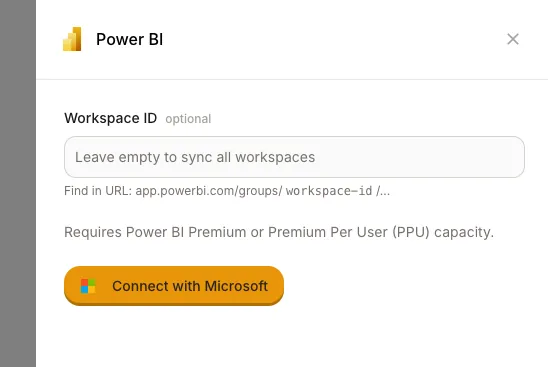
Go to Settings, then Semantic Layers, then Power BI. You can enter a specific Workspace ID if you only want to sync one workspace, or leave it empty to sync everything you have access to.
Click "Connect with Microsoft," sign in, and Dot starts importing your models.
Here's what gets synced:
Your workspaces show up as schemas in Dot. Your datasets and semantic models appear as tables. Every measure and column includes its description and data type. And all the relationships between tables carry over, too.
Dot periodically re-syncs to catch any new or changed models. You can also trigger a manual sync whenever you need it.
Two requirements worth noting: you'll need Power BI Premium or Premium Per User (PPU) capacity, and the "Dataset Execute Queries REST API" needs to be enabled in your tenant settings.
The screenshot problem (and why it matters)
Let's talk about something that quietly eats hours every week in most organizations.
Monday morning. Someone on the data team opens Power BI. They refresh the dashboards. They take screenshots of 10 to 15 charts. They paste those screenshots into a PowerPoint deck.
They add bullet points explaining what changed and why. They send it to leadership.
By Wednesday, the data is already stale. And if the CEO asks a follow-up question during the review meeting, the answer is "let me get back to you on that."
This is the reality for a lot of teams, and it's not because Power BI is broken. It's because dashboards were built to show data, not explain it.
Dot changes this in two ways.
First, anyone can ask follow-up questions directly in Slack or Microsoft Teams. "Why did conversion drop in EMEA last week?"
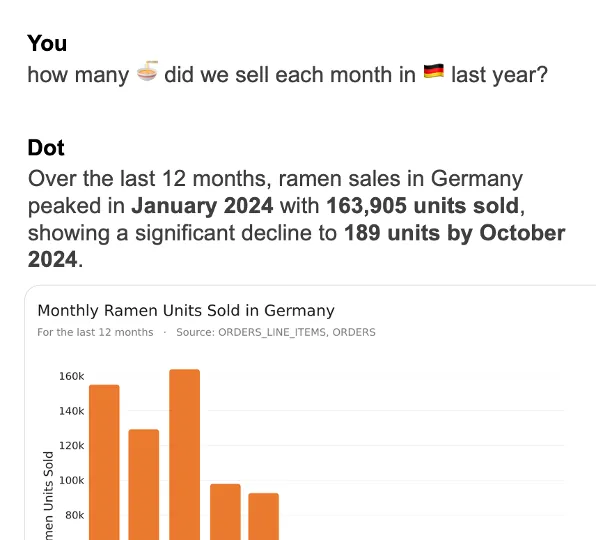
Dot queries the semantic model, runs the analysis, and comes back with a plain-English explanation in minutes. No DAX. No dashboard hunting.
Second, Dot auto-generates executive-ready business review reports on a set schedule. These aren't just charts.
They're written narratives that explain what happened, what changed compared to the previous period, and where attention is needed. Pulled directly from your governed Power BI semantic models.
No more Monday morning screenshot rituals.
Three integrations across the Microsoft ecosystem
The Power BI semantic layer connection is one piece of a broader fit within the Microsoft ecosystem.
Dot also integrates with Microsoft Teams, so stakeholders can ask data questions right where they already work. No new tool to learn, no new tab to open. A question in Teams gets a full analysis back in minutes.
And with the PowerPoint integration, Dot can deliver insights directly into presentation-ready formats.
Instead of manually copying charts from a dashboard into slides, the data flows from the semantic model through Dot into a report that leadership can actually act on.
Three touchpoints, one governed data layer underneath all of them.
What This Means for Data Teams
If you're a data leader or analytics engineer who has invested in Power BI semantic models, Dot doesn't replace that investment. It amplifies it.
Your team keeps building and governing the semantic layer in Power BI. That's where the business logic lives, and that doesn't change.
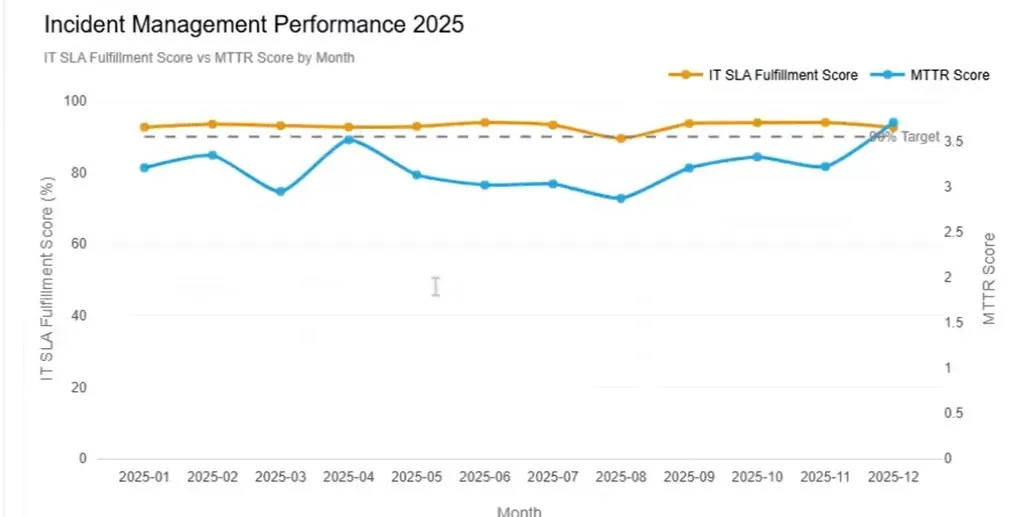
What changes is who can access those insights and how fast. Instead of only the people who know DAX getting answers, everyone in the organization can ask questions in natural language and get responses grounded in the exact same definitions your dashboards use.
For data teams specifically, this means fewer ad-hoc requests clogging up the queue.
Emerge, a logistics company using Dot, saw their team saving over 2,000 hours per year once stakeholders could self-serve through natural language instead of filing tickets.
And because every insight Dot produces comes with a full audit trail linking back to the underlying queries and datasets, data leaders can trust that the numbers are traceable. No black box.
Getting started
Dot offers a free plan that includes 300 one-time credits and full access to Pro features.
If your team is already running Power BI Premium or PPU, the connection takes minutes. Sync your semantic models, ask your first question, and see how Dot handles it compared to opening a dashboard and writing DAX yourself.
You can try Dot with Power BI for free, or book a demo if you'd rather have someone walk you through how it fits your existing setup.
Your Power BI semantic models already contain everything your organization needs to make better decisions. Dot just makes sure those answers don't stay locked behind dashboards.
Theo Tortorici
Theo writes about AI-powered analytics, data tools, and the future of business intelligence at Dot.